Multi-Vehicle Route Optimization API
Contents
The Multi-Vehicle Route Optimization API automates the process of taking a list of orders and stop locations and building the most efficient routes to serve them. It optimizes routes while taking into account the challenges fleets face every day—from managing order flows and resources (drivers and trucks) to meeting strict customer time windows and service-level agreements.
This RESTful API is built on the same routing algorithm as our Appian DirectRoute and DRTrack user interfaces. It can be integrated into any solution that requires a powerful, trusted routing engine with a 20-year track record of serving large fleets with complex routing problems.
Building Realistic Routes
The API allows you to pass a wide range of parameters as inputs so the routing solution returned can realistically be executed on road. These parameters account for a fleet’s many constraints when routing and scheduling, including:
For Stops/Orders
- Time Windows
- Location
- Stop Time
- Order Volumes
For Drivers
- Driver Skills
- Breaks
- Maximum Drive Time
- Maximum Drive Time before Layover
- Min and Max Layover Time
- Target Work Time
- Normal Work Day
- Re-dispatching rules
- Max Work Time
For Vehicles
- Special Equipment Needs
- Max Distance
- Capacity (Tied to Volume Provided on Order Level)
For Routes
- Early/Late Start Time
- Normal Start Time
- Latest Finish
- Route Start/End Date
What is a Route Solution?
Based on your inputs, a route Solution is returned that contains all of the orders/stops (routed and unloaded), the routes with stop sequences assigned, and the solution statistics (miles, hours, arrive/departs, cost, violations, etc.) The illustrations below show how the routing algorithm turns orders into routes.
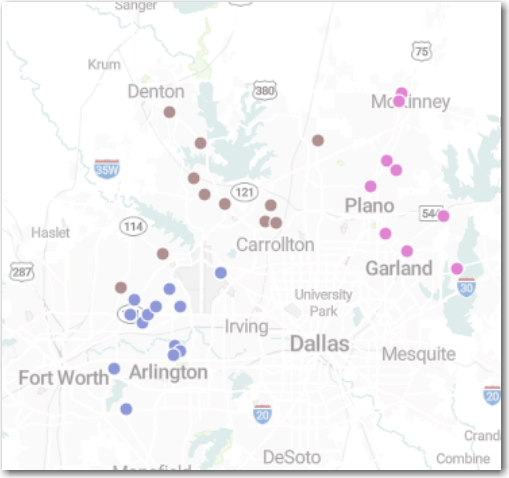
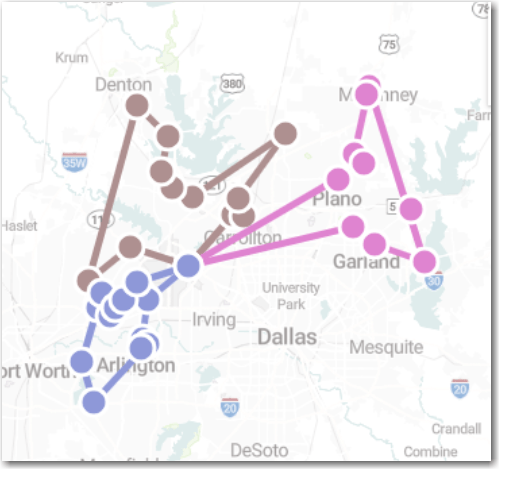
Note: In this example, all of the stops passed into the algorithm were assigned a route and sequence which was optimal, given the constraints used. Depending on those constraints, however, the API may not assign all orders to a route. They will remain unloaded and will be returned by the API as such.
Basic Use Cases
This API can not only be used to build efficient routes, but also to adjust those routes as needs change throughout the day. API endpoints include:
Solve- Send in orders/stops, resources (driver/trucks), and rules/settings and generate a solution including the number of routes, which stops are on which routes, the sequence of those stops, and solution statistics.OptimizeSequence- Send in routes with a stop sequence to try to generate a more optimized sequence of stops while adhering to all of the rules/settings that are passed.OptimizeFull- Also known as “optimize between,” you can send in multiple routes and the algorithm will return whether moving stops between routes will create a more optimal solution while adhering to all rules and settings passed in.Suggest- Send in a route or group of routes and an unrouted order/stop. The algorithm will return a route/sequence suggestion for the stop as well as the statistics associated with adding the stop to the routes suggested.RecalculateOperation- Re-calculate will take in existing routes and settings, re-initialize the routes, and return back the routes as calculated by the algorithm. This can be used to tweak configurations or settings, and then update the route plans to match.InvertOperation- Performs an invert operation on the supplied routes. This reorders the stops last to first for each leg.MoveStopsOperation- This endpoint allows orders to move from one route to another, load unloaded stops onto a route, or manually add the order to a route. This is commonly used with Suggest or Recalculate.UnloadStopsOperation- This operation allows you to remove (unload) a stop from a routed solution. This is commonly used with Suggest or Recalculate.UnloadRoutesOperation- This operation is used to unload all stops from a given route and return them to unloaded status. Can also be used to unload all stops from all routes.
Accessing the API
The API requires a licensing agreement with Trimble MAPS. Contact us to learn more or to request a demo.
All requests to Multi-Vehicle Routing API must include a valid API Key. The API Key must be supplied with every request. If the client making the API request has an invalid API key, then the key will fail to authenticate.
For POST and GET requests, insert the API Key in the http Authorization: header.
Key Concepts
In order to use the Multi-Vehicle Route Optimization API, you will need to understand the following concepts used throughout the API documentation.
Solving Routing Problems
Building out routes for an entire fleet is, in short, a “Problem.” That’s why Solve is the main endpoint for the Route Optimization API. It takes in all of the information about the orders a fleet has to service and returns a Solution. The Solution includes the route plan as well as statistics about the plan—things such as time, distance and cost.
The other API endpoints are ways to modify, update or attempt to improve (optimize) that Solution.
Constraints
The term constraints is used generally for things the routing algorithm has to “keep in mind” to be sure it’s solving the routing problem in a useful way. Constraints include customer constraints, such as time windows and order volumes, and fleet constraints, such as available equipment and drivers—based on max work time and required breaks.
There is also a constraints object that allows you to control how the routing algorithm itself behaves. It includes settings such as how far apart stop locations can be on the same route, how many total stops can be on a route, and the maximum wait time at a stop.
Violations
A violation is a term used generally for anything that fails to comply with constraints. The routing algorithm always tries to avoid violations but, in some cases, it may return the violation and leave it to the user to decide whether it’s an acceptable violation in order to complete a route. (For example, maybe it’s OK for a driver to return to the depot late that particular day?)
What is a Stop?
A stop represents when a truck is stopping for a delivery or a pickup. Each stop is defined in API requests by the following information:
-
orders: An Order represents a sales order, transfer order, or return material authorization (RMA) in an enterprise resource planning (ERP) application. At a stop, there may be a single order or multiple orders. On a given order, there could be one or more line items. Line items provide additional information about the order, such as how long it takes to unload it and the order volume (pallets, pieces, etc.) -
config: The Config contains information or constraints related to the stop that are necessary to ensure routes the API generates will work in the real world. That includes details such as available dates and time windows for a delivery or pickup. -
coordinates: A longitude, latitude pair representing the exact location of the stop.
Unloaded Stops
Unloaded stops are any stops that are unassigned to a route and need to either be distributed to existing routes or loaded onto new routes. A loaded stop is a stop that has been assigned to a route. Unloaded stops are both:
- An input into the API when passing the POST request payload.
- An output in the API response (Solution), identifying stops that didn’t “fit” into any routes because of time, resources or other constraints.
EqCode
EqCode is a data element that has a variety of uses for stop-specific constraints including stop to equipment matching, first stop/last stop, stop exclusions, and more. A value is passed on a line/order level and then the same element is passed on a vehicle, driver, or route level (vehicleProperties > eqCode OR driverProperties > eqCode OR routingProperties > eqCode) and that line/order will be routed on the appropriate route, driver or vehicle.
An example is an order that needs to be delivered on the single liftgate truck in the fleet. The order would receive an EqCode indicating the liftgate delivery (like LG), then the vehicle or route would get the same EqCode, which tells the algorithm to ensure that the order is routed on that vehicle or route only. If an EqCode is passed on an order/line and a corresponding vehicle or route with that EqCode does not exist, that order/line will remain unloaded.
Another common use of EqCodes is to route inside of territory/geographic boundaries. All of the stops inside a territory can be given the same EqCode as well as the resource/resources that operate inside of that boundary and they are routed together.
Stop Specific Reserved EqCodes
There are also several reserved EqCodes that do not require a value on the vehicle or route that perform different functions:
BH- Indicates that an order/line is a backhaul and should be loaded at the end of a route with product to return to the DC/Terminal. Volumes for these orders should be positive, even though this is a pickup.!%- Priority codes allow users to indicate a priority level for a given order/line, which lets the algorithm know to load the route close to the first sequence. The syntax is!and a value between 1 and 9. Lower values indicate a higher priority.00- Sequence code that allows an order/line to be placed as the first stop on a route.99- Sequence code that allows an order/line to be placed as the last stop on a route.^xx- Exclusion codes are passed on orders/lines that CANNOT be on the same route together. The appropriate syntax is^A1and^A1on both orders.&xx- Inclusion codes are passed on orders/lines that MUST be on the same route together. The appropriate syntax is&A1and&A1on both orders.#AA1/#AA2- Normally, the Appian algorithm is domicile centric, meaning that routes start and end at the same place and that mid-route pickups not returning to the terminal are not accounted for. Using these O/D pair EqCodes on a pair of orders/lines ensure that the pickup and delivery orders/lines will be on the same route and that the order with the EqCode ending in 1 will come before the one ending with a 2. The 1 indicating the pickup and 2 indicating the delivery. The total percent of pairs of orders with O/D pairs should not exceed 20% of a given set passed into the algorithm.- Time windows must allow for the pickup and delivery events to happen in sequence.
- The alpha component of these must be capitalized.
- The quantity values of the pickup must be negative.
Time Windows
Time windows represent the available hours or appointment times at each stop that must be considered during route construction. A good rule of thumb is to pass values in for each day of the week. The algorithm will not route an object on an incorrect day based on the way the vehicle and driver objects are configured.
How to Shape Routes
When generating a route via the Solve endpoint, you can pass not only the unloaded stops, but also a wide range of additional details to ensure the API generates the best routes possible for a particular fleet. In addition to unloaded stops, requests to Solve can contain:
routes: Routes are already built and defined routes the algorithm can be tasked with building upon or further optimizing. Routes information helps the algorithm determine whether it can assign orders to existing routes as well as how it can avoid any conflicts with existing routes—in particular with resource (driver/asset) allocation. The prime example is when a company has fixed or static routes and the algorithm needs to be used for slotting of new or off-day deliveries or even just used as a route calculator.availableRoutes: These settings let the routing algorithm know about the resources that are available to be used when it generates routes. It includes a list of drivers, vehicles and other rules or constraints on the routes themselves. The difference betweenroutesandavailableRoutesisavailableRoutesis passed in with the intention of being “empty” and the algorithm solving the problem using the values and constraints passed in. Routes, however, indicate at least some of the Solution has previously been calculated.config: Config settings are available for each stop, as noted in the Stop definition. These are additional, Solution-level settings that allow you to customize the way the routing algorithm behaves. Config settings include everything from high-level settings, such as distance units (miles or kilometers) to behaviors by which orders are able to be consolidated.
Distance Calculation
Distance calculation is extremely important for the fleet optimization algorithm to accurately weigh the best options. By default, the API uses the straight_line distance between locations for optimization. However, you also have the option to calculate much more accurate distances using Trimble Transportation’s new Ultrafast Distance Matrix (UFDM), which is available as an add-on. UFDM not only allows you generate distances in near real-time for a matrix of up to 50,000 by 50,000 locations, but it also can take into account the type of vehicle being routed and the worldwide region. As a result, distances and drive times are calculated based on safe and legal commercial vehicle routes.
Two settings are required in the config > distances object in order to correctly use UFDM.
- Set the
methodparameter tostraight_line,roadnetworkorapproximate(the default value).Roadnetworkuses commercial road distances and drive times based on the vehicle profile selected.Approximateuses proprietary Trimble Maps calculations to calculate drive times while using theroadnetwork. - Set the
regionparameter to eitherna(North America) oreu(Europe)
For additional accuracy, you can then set the ProfileName parameter to reflect the type of vehicle used for distance calculation. Options include:
North_American_AutoNorth_American_HeavyEU_AutoEU_Heavy_RigidEU_Heavy_ArticulatedNorth_American_MidsizeNorth_American_Light_CommercialEU_MidsizeEU_Light_Commercial
Example
"distances": {
        "method": "roadnetwork",
        "region": "eu",
        "ProfileName": "EU_Heavy_Articulated",
Workflow
The Route Optimization API has several endpoints designed to be used individually or in tandem, allowing you to complete different routing and optimization workflows. Those workflows include:
- Dynamic Fleet Routing
- Route Calculation
- Fixed Route Optimization
- New Order Placement
- Inverting a Route
- Unloading From Routes
- Moving a Stop from One Route to Another
- Recalculating a Solution
- Authentication
Dynamic Fleet Routing
This is the most common use case, where you want the algorithm to generate the best possible answer in terms of number of routes needed for a group of orders. To do this, you would:
-
Use the
Solveendpoint to generate theSolution. The API response includes the orders, with route and stop sequence, and the route and solution statistics. -
The system can perform a between-route optimization (attempting to move stops between routes to reduce the overall cost of the solution) automatically or it can be triggered after the fact by sending the return from the
Solveendpoint into theOptimizeFullendpoint.
Route Calculation
Another common use case involves orders that already have a route and sequence assigned to them and are stored in an ERP. These represent fixed or static routes. Based on things such as the frequency of customer ordering, order volume and ad-hoc or off-day deliveries, the “daily” route may vary wildly from the fixed route assignment stored in an ERP.
Using the Solve endpoint with orders that have a route and sequence will return route and solution statistics as well as route violations (time windows, capacity, etc.) that need to be considered.
Fixed Route Optimization
Based on the results from the Route Calculation workflow, you might want to either have the algorithm optimize the sequence of routes or move stops between routes to create a lower cost solution for that particular day. You could call the Solve endpoint first to receive route and solution statistics for an end user to view in an UI, and then call OptimizeSequence to receive updated statistics for the user to view.
Alternatively, the Solve endpoint isn’t needed. You could call the OptimizeSequence or OptimizeFull endpoints to just receive updated route statistics.
New Order Placement
Once a solution has been created or simulated, it is ready for execution. This doesn’t usually mean that planning is over; there are several instances where orders need to be added to a solution either before the trucks have left the terminal/warehouse/distribution point or while that route is on the road.
You have several options to solve this use case:
-
Pass an entire solution back into the
Solveendpoint with route and sequence assigned to orders that have previously been routed. New orders that need to be routed around the existing solution would be passed in without a route and sequence. The algorithm will add the new orders to the appropriate slots on the existing routed solution. This is best used prior to the routes being on the road. -
Another approach would be to use the
Suggestendpoint. This endpoint gives suggestions for new order placement in a previously routed solution. The response of this endpoint is suggestions of routes (that have already been created) where the new order could be inserted with incremental distance, cost and any violations adding that stop to the route would cause. You could build a UI experience on top of this endpoint to display the best suggestions and allow the end user to load a single stop onto a route via theSolveendpoint.Suggestcould be used to slot orders onto routes on the road already. The user controls what route details are sent in—only sending in stops that have yet to be completed and the new order would let the algorithm put the stop in the appropriate sequence based on the stops remaining.
Inverting a Route
Based on planner or driver preference, an entire route may need to be inverted (have the sequence reversed). An example would be if the last stop on a route ends away from the DC, but the driver wants to end closer to the distribution point. In this case, the entire sequence of a route could be reversed.
Using the InvertOperation endpoint will return the route passed in with the sequence reversed, as well as the route and solution statistics. This can be used on multiple routes or a single route.
Unloading From Routes
There are times when orders need to be removed from a route, either before or after it’s in progress. There are also times when an entire route needs to be unloaded. In these cases, use the UnloadStopsOperation and UnloadRoutesOperation endpoints. You pass in routes and stops you wish to unload and are returned any unloaded stops as well as the updated route plan/statistics for the remaining solution.
Moving a Stop from One Route to Another
An integral part of route editing is the ability to move stops from one route to another, usually through a UI. That UI could call the MoveStopsOperation endpoint to move an order from one route in the solution to another. The system would then return the updated route and solution statistics as well as any violations on the destination route caused by moving that order.
This is commonly used with the Suggest endpoint, which can be used on routed stops to find another candidate route to which a stop can be moved. Once the user identifies this candidate route, the MoveStopsOperation can make the change for the user.
Recalculating a Solution
There will be some instances where adding a constraint or changing a setting will change a particular route or the solution. (For example, adding a driver to a route or changing an optimization penalty.) To get the updated route or solution statistics, the Solve endpoint is appropriate, BUT it is an asynchronous call.
To get the same recalculation, the RecalculateOperation endpoint would be faster due to its synchronous nature. This doesn’t solve for unloaded stops, but if a user just wants to update a data element and not use the algorithm for anything other than a route calculator, RecalculateOperation is a better choice.
Polling Service
The Solve and Optimize endpoints are Asynchronous services, which means the caller is returned a token (taskID) that is used to retrieve the actual routing solution. To retrieve the solution:
-
Make a GET call to the polling endpoint:
https://services.appian.trimblemaps.com/broadcast/v1/polling/{taskID}. This request needs to be authenticated with your API key. -
The polling service checks whether the request has been processed and results are available.
-
If results are not available, you will get a response such as:
{
    "id": "TaskID",
    "status": "Created",
    "percentCompleted": 0,
    "created": "2023-02-06T17:36:16.113Z",
    "updated": "2023-02-06T17:36:16.113Z"
}
- If results are available, you will get a response of
Completedand will receive the route results within theroutesobject of the response JSON.
    "id": "733ce7e5-d385-466f-ace7-948cc3026371",
    "status": "Completed",
    "percentCompleted": 100,
    "created": "2023-02-06T17:36:16.113Z",
    "updated": "2023-02-06T17:36:17.504Z",
    "payload": {
        "routes": [{
...
We recommend checking the polling URL for results at 5-second intervals. The code below is an example of how to do this:
while(pollResponse.status != "Completed"){
    await pollingDelay(5000);
    pollRequest = await fetch(solvePollingURL,{
      method: "GET",
      headers: {
        "Content-Type": "application/json",
        "Authorization": "Bearer" + " " + authToken
      }
    });
    pollResponse = await pollRequest.json();
  }
const pollingDelay = async (milliseconds) => {
  await new Promise(resolve => {
    return setTimeout(resolve, milliseconds)
  });
};
Solve Endpoint Samples
Sample Request Body
{
  "notificationOptions": {
    "subscriptions": [
      {
        "type": "polling"
      }
    ]
  },
  "request": {
    "routes": [],
    "unloadedStops": [
      {
        "internalKey": 202767,
        "orders": [
          {
            "orderId": "92",
            "internalKey": 201965,
            "lineItems": [
              {
                "lineItemId": "null",
                "internalKey": 312636,
                "fixedTime": 336,
                "volumes": []
              }
            ]
          }
        ],
        "coordinates": [-85, 40],
        "config": {
          "timeWindows": {
            "sunday": {
              "hours": [
                {
                  "open": "0001-01-01T00:00:00",
                  "close": "0001-01-01T23:59:00"
                }
              ]
            },
            "monday": {
              "hours": [
                {
                  "open": "0001-01-01T00:00:00",
                  "close": "0001-01-01T23:59:00"
                }
              ]
            },
            "tuesday": {
              "hours": [
                {
                  "open": "0001-01-01T00:00:00",
                  "close": "0001-01-01T23:59:00"
                }
              ]
            },
            "wednesday": {
              "hours": [
                {
                  "open": "0001-01-01T00:00:00",
                  "close": "0001-01-01T23:59:00"
                }
              ]
            },
            "thursday": {
              "hours": [
                {
                  "open": "0001-01-01T00:00:00",
                  "close": "0001-01-01T23:59:00"
                }
              ]
            },
            "friday": {
              "hours": [
                {
                  "open": "0001-01-01T00:00:00",
                  "close": "0001-01-01T23:59:00"
                }
              ]
            },
            "saturday": {
              "hours": [
                {
                  "open": "0001-01-01T00:00:00",
                  "close": "0001-01-01T23:59:00"
                }
              ]
            },
            "config": {
              "completeBeforeEndOfWindow": false
            }
          },
          "rushHourAdjustments": {
            "am": {
              "start": "0001-01-01T00:00:00",
              "end": "0001-01-01T00:00:00",
              "multiplier": 1
            },
            "pm": {
              "start": "0001-01-01T00:00:00",
              "end": "0001-01-01T00:00:00",
              "multiplier": 1
            }
          },
          "buffers": {
            "early": 0,
            "late": 0,
            "penalty": 0
          },
          "earliestDate": "2020-03-25T00:00:00",
          "latestDate": "2021-10-05T00:00:00",
          "sizeRestriction": 0,
          "maxSplits": 0,
          "zone": 1
        }
      }
    ],
    "availableRoutes": [
      {
        "origin": [-85.9373168945312, 39.2388496398926],
        "driverProperties": {
          "eqCode": "test",
          "costs": {
            "layover": 0,
            "hourly": 0,
            "overTimeCosts": [
              {
                "cost": 0,
                "hours": 0
              },
              {
                "cost": 0,
                "hours": 0
              },
              {
                "cost": 0,
                "hours": 0
              },
              {
                "cost": 0,
                "hours": 0
              }
            ],
            "unloadHour": 0,
            "waitHour": 100,
            "fixed": 0
          },
          "workRules": {
            "breakTimes": [
              {
                "start": 0,
                "duration": 0
              },
              {
                "start": 0,
                "duration": 0
              },
              {
                "start": 0,
                "duration": 0
              }
            ],
            "maxDriveTime": 11,
            "maxDriveTimeBeforeLayover": 0,
            "minLayoverTime": 0,
            "maxLayoverTime": 0,
            "targetWorkTime": 0,
            "workDay": 0,
            "minHoursRemainingForRedispatch": 0,
            "maxWorkTime": 14,
            "unloadPerformance": 0,
            "maxLayovers": 0
          }
        },
        "vehicleProperties": {
          "eqCode": "test",
          "costs": {
            "distance": 1,
            "fixed": 500,
            "drop": 0,
            "unit": 0,
            "hourly": 15
          },
          "workRules": {
            "preTrip": 15,
            "postTrip": 15,
            "maxDistance": 0,
            "unloadPerformance": 0
          },
          "volumes": [
            {
              "alias": "Pallet Qty",
              "value": 99999
            },
            {
              "alias": "Item Quantity",
              "value": 99999
            },
            {
              "alias": "Item Weight",
              "value": 99999
            },
            {
              "alias": "Extended Cost",
              "value": 99999
            },
            {
              "alias": "Hazmat",
              "value": 99999
            },
            {
              "alias": "Quantity",
              "value": 99999
            },
            {
              "alias": "Weight",
              "value": 99999
            },
            {
              "alias": "Capacity",
              "value": 99999
            },
            {
              "alias": "Item Capacity",
              "value": 99999
            }
          ],
          "rushHourAdjustments": {
            "am": {
              "start": "0001-01-01T00:00:00",
              "end": "0001-01-01T00:00:00",
              "multiplier": 1
            },
            "pm": {
              "start": "0001-01-01T00:00:00",
              "end": "0001-01-01T00:00:00",
              "multiplier": 1
            }
          },
          "zone": 0
        },
        "routingProperties": {
          "eqCode": "test",
          "oneWay": false,
          "redispatch": true,
          "turnTime": 0,
          "costs": {
            "waitHour": 0,
            "layover": 0
          },
          "workRules": {
            "times": {
              "earlyStart": "0001-01-01T06:00:00",
              "lateStart": "0001-01-01T00:00:00",
              "normalStart": "0001-01-01T00:00:00",
              "lateFinish": "0001-01-01T20:00:00"
            },
            "availableFrom": {
              "startDate": "0001-01-01T00:00:00",
              "endDate": "0001-01-01T00:00:00"
            }
          },
          "zone": 0
        },
        "routeStartTime": "0001-01-01T00:00:00"
      }
    ],
    "config": {
      "solution": {
        "dispatchDate": "2020-03-25",
        "country": "USA"
      },
      "adjustments": {},
      "consolidation": {
        "consolidateFixedTime": true
      },
      "optimization": {
        "options": {
          "level": 4,
          "passLimit": 10,
          "timeLimit": 18000,
          "firstPassMoveTime": 1,
          "subseqPassMoveTime": 2,
          "firstPassSwapTime": 2,
          "subseqPassSwapTime": 2,
          "minValue": 1
        }
      },
      "algorithm": {
        "lambda": {
          "value": 1.2,
          "increments": 0.1,
          "iterations": 1
        },
        "boxExpand": 25
      },
      "constraints": {
        "maxDistanceBetweenStops": 1000,
        "maxClosestStops": 20,
        "maxStops": 999,
        "maxWaitTime": "1000",
        "maxLayover": "10",
        "splitting": {
          "evaluateAllSplittingOptions": true
        }
      },
      "resourceScheduling": {}
    },
    "resourceSchedule": []
  }
}
Sample Response
(The response is returned after the polling service indicates the solution is Completed.)
{
"id": "b41d8381-6d3c-4ed3-b078-d4d77168a8f0",
"status": "Completed",
"percentCompleted": 100,
"created": "2025-01-23T18:15:03.425Z",
"updated": "2025-01-23T18:15:06.247Z",
"payload": {
"routes": [
{
"internalKey": 1,
"plan": {
"start": "2020-03-25T06:00:00",
"end": "2020-03-25T16:09:39",
"statistics": {
"costs": {
"total": "873.09",
"hourly": "152.41",
"mileage": "220.68",
"layover": "0",
"overtime": "0",
"wait": "0",
"unload": "0",
"drop": "0",
"fixed": "500",
"unit": "0",
"penalty": "0"
},
"distance": "220.68",
"driveHours": "4.0608333333333333333333333333",
"workHours": "10.160833333333333333333333333",
"stops": 3,
"legs": 1
},
"utilization": [
{
"alias": "CAPACITY",
"value": "0"
},
{
"alias": "EXTENDED COST",
"value": "0"
},
{
"alias": "HAZMAT",
"value": "0"
},
{
"alias": "ITEM CAPACITY",
"value": "0"
},
{
"alias": "ITEM QUANTITY",
"value": "0"
},
{
"alias": "ITEM WEIGHT",
"value": "0"
},
{
"alias": "PALLET QTY",
"value": "0"
},
{
"alias": "QUANTITY",
"value": "0"
},
{
"alias": "WEIGHT",
"value": "0"
}
],
"violations": [
{
"leg": 1,
"name": "None"
}
],
"components": []
},
"legs": [
{
"leg": 1,
"stops": [
{
"internalKey": 202767,
"routeKey": 1,
"sequence": 1,
"leg": 1,
"terminal": false,
"plan": {
"break": "0",
"distance": "110.03",
"duration": "5.6",
"driveTime": 7291,
"layover": "0",
"wait": "0",
"arrival": "2020-03-25T08:16:31",
"departure": "2020-03-25T13:52:31",
"violations": [
{
"name": "None"
}
]
},
"orders": [
{
"orderId": "92",
"internalKey": 312636
}
]
}
],
"terminals": {
"start": {
"internalKey": 1,
"routeKey": 1,
"sequence": 0,
"leg": 1,
"terminal": true,
"plan": {
"break": "0",
"distance": "0",
"duration": "0.25",
"driveTime": 0,
"layover": "0",
"wait": "0",
"arrival": "2020-03-25T06:00:00",
"departure": "2020-03-25T06:15:00",
"violations": [
{
"name": "None"
}
]
}
},
"end": {
"internalKey": 1,
"routeKey": 1,
"sequence": 2,
"leg": 1,
"terminal": true,
"plan": {
"break": "0",
"distance": "110.65",
"duration": "0.25",
"driveTime": 7328,
"layover": "0",
"wait": "0",
"arrival": "2020-03-25T15:54:39",
"departure": "2020-03-25T16:09:39",
"violations": [
{
"name": "None"
}
]
}
}
},
"statistics": {
"leg": 1,
"start": "2020-03-25T06:00:00",
"end": "2020-03-25T16:09:39",
"costs": {
"total": "873.09",
"hourly": "152.41",
"mileage": "220.68",
"layover": "0",
"overtime": "0",
"wait": "0",
"unload": "0",
"drop": "0",
"fixed": "500",
"unit": "0",
"penalty": "0"
},
"distance": "220.68",
"driveHours": "4.0608333333333333333333333333",
"workHours": "10.160833333333333333333333333",
"stops": 1
}
}
]
}
],
"unloadedStops": []
}
}